CloudSec-Pro Exam Guide
This CloudSec-Pro exam focuses on practical knowledge and exam application scenarios related to the subject area. It evaluates your ability to understand core concepts, apply best practices, and make informed decisions in realistic situations rather than relying solely on memorization.
This page provides a structured exam guide, including exam focus areas, skills measured, preparation recommendations, and practice questions with explanations to support effective learning.
Exam Overview
The CloudSec-Pro exam typically emphasizes how concepts are used in professional environments, testing both theoretical understanding and practical problem-solving skills.
Skills Measured
- Understanding of core concepts and terminology
- Ability to apply knowledge to practical scenarios
- Analysis and evaluation of solution options
- Identification of best practices and common use cases
Preparation Tips
Successful candidates combine conceptual understanding with hands-on practice. Reviewing measured skills and working through scenario-based questions is strongly recommended.
Practice Questions for CloudSec-Pro Exam
The following practice questions are designed to reinforce key CloudSec-Pro exam concepts and reflect common scenario-based decision points tested in the certification.
Question#1
A payload is successfully sent in an HTTP request due to a vulnerable library detected using the application security capabilities of Cortex Cloud.
Which action will remediate the issue?
A. Upgrade the vulnerable package to a secure build.
B. Close port 443 to prevent external access to the application.
C. Roll back the package to a less vulnerable version.
D. Patch the server on which the application is running.
Question#2
A developer writes a serverless application to extract a field from a file in an S3 bucket. The Lambda function is assigned the S3FullAccess managed policy.
Refer to the scenario to answer this question:
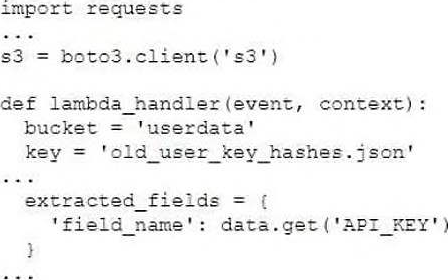
Which two actions will allow a Cortex Cloud user to view the effective permissions of the Lambda function? (Choose two.)
A. Opening the Identity dashboard, filtering for serverless functions, opening the function and clicking on “Access”
B. Viewing all Compute assets and applying the Serverless = Yes filter in the inventory
C. Viewing the Access tab in the non-human identities inventory
D. Selecting the Access tab in the serverless function inventory after selecting the function
Question#3
A development team is using Cortex Cloud for a centralized view to monitor and analyze application security posture.
Which two components of Cortex Cloud will enable secure software development in this scenario? (Choose two.)
A. Under Dashboard & Reports, select Dashboard ―> API Security in the page dropdown menu.
B. Under Inventory, select All Assets ―> Code ―> CI/CD Pipelines from the menu.
C. Under Dashboard & Reports, select Dashboard ―> Application Security in the page dropdown menu.
D. Under Modules, select Application Security ―> AppSec Dashboard from the menu.
Question#4
A developer writes a serverless application to extract a field from a file in an S3 bucket. The Lambda function is assigned the S3FullAccess managed policy.
Refer to the scenario to answer this question:
Assuming that a fix is available for the vulnerable requests library declared in the requirements.txt file, how would a user remediate this vulnerability from Cortex Cloud?
A. Click on the vulnerability issue, then the Actions tab, then issue a pull request.
B. Click “Accept suggested changes” under the code shown in Known Usage.
C. Click into the serverless function inventory, open the asset, then create a pull request.
D. Click on the vulnerability issue, then the Actions tab, then issue a push request.
Question#5
A threat intelligence team determines that IP addresses associated with brute force attacks on the VPN gateways are historically linked to a ransomware campaign.
Which two features can be defined in Cortex to trigger alerts on the malicious objects and on specified system processes linked to the tactics, techniques, and procedures (TTPs) of the threat actors? (Choose two.)
A. External dynamic list
B. Security event anomaly
C. Behavioral indicator of compromise (BIOC)
D. Indicator of compromise (IOC)
Disclaimer
This page is for educational and exam preparation reference only. It is not affiliated with Palo Alto Networks, Cloud Security Engineer, or the official exam provider. Candidates should refer to official documentation and training for authoritative information.


