NSE6_FSM_AN-7.4 Exam Guide
This NSE6_FSM_AN-7.4 exam focuses on practical knowledge and exam application scenarios related to the subject area. It evaluates your ability to understand core concepts, apply best practices, and make informed decisions in realistic situations rather than relying solely on memorization.
This page provides a structured exam guide, including exam focus areas, skills measured, preparation recommendations, and practice questions with explanations to support effective learning.
Exam Overview
The NSE6_FSM_AN-7.4 exam typically emphasizes how concepts are used in professional environments, testing both theoretical understanding and practical problem-solving skills.
Skills Measured
- Understanding of core concepts and terminology
- Ability to apply knowledge to practical scenarios
- Analysis and evaluation of solution options
- Identification of best practices and common use cases
Preparation Tips
Successful candidates combine conceptual understanding with hands-on practice. Reviewing measured skills and working through scenario-based questions is strongly recommended.
Practice Questions for NSE6_FSM_AN-7.4 Exam
The following practice questions are designed to reinforce key NSE6_FSM_AN-7.4 exam concepts and reflect common scenario-based decision points tested in the certification.
Question#1
You want to create a rule with multiple subpatterns but trigger an incident only if three different subpatterns are matched over a 24-hour period.
Where must you define the time period that the rule uses to evaluate all the subpatterns? (Choose one answer)
A. Define the time window in each individual subpattern.
B. Define the time window under the General tab of the rule.
C. Define the time window under the Define Condition tab of the rule.
D. Define the time window in the Define Action section of the rule.
Explanation:
The time period must be defined under the Define Condition tab of the rule. The FortiSIEM Study Guide states that a rule has three components: General, Condition, and Action. The General section defines the overall purpose and scope of the rule, the Condition section specifies which conditions trigger the rule, and the Action section configures what happens after the rule is triggered. The Study Guide further explains that on the Define Condition page, FortiSIEM specifies “the conditions―event attributes and thresholds―that will trigger the rule and create an incident,” including “the time window” within which the subpatterns must match for the rule condition to be satisfied. It also states that when there is more than one subpattern, you must define the logic between subpatterns and their relationships or constraints.
For a 24-hour multiple-subpattern rule, the guide gives an example using an 86400-second time window, which equals 24 hours, and shows it under Resource > Rules > Define Condition.
Therefore, the time period is not configured inside each individual subpattern, not under General, and not under Define Action.
Question#2
Refer to the exhibit.
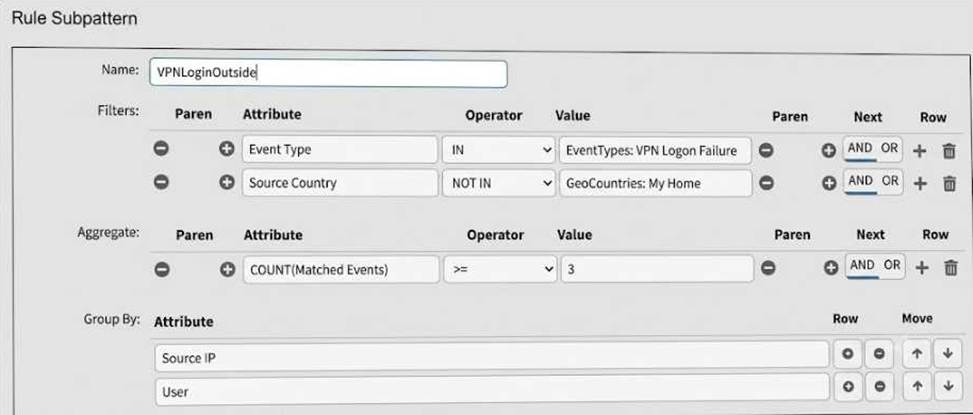
What is this rule attempting to match? (Choose one answer)
A. Failed VPN logon attempts from three or more different outside countries.
B. Failed VPN logon events from a source outside the home country.
C. Failed VPN logon attempts from three or more different sources inside the home country.
D. Excessive VPN logon failures from a source inside the home country.
Explanation:
The rule is matching VPN logon failure events where the Source Country is outside the configured home country. In the exhibit, the filter section shows Event Type IN EventTypes: VPN Logon Failure and Source Country NOT IN GeoCountries: My Home. That means the source must be outside the home-country geo group. The aggregate condition shows COUNT(Matched Events) >= 3, so the rule is looking for at least three matching failed VPN logon events. The Group By section uses Source IP and User, so FortiSIEM evaluates the count per unique source IP and user combination, not by different countries.
The FortiSIEM Study Guide explains that a rule subpattern contains three components: Filter , Aggregate, and Group By. It states that the filter identifies the matching event group, the aggregate function specifies how many events must match, and Group By combines events with the same grouped attributes into one row while the count tracks those events.
Option A is wrong because the rule does not count different countries.
Options C and D are wrong because the source country is explicitly NOT IN My Home, not inside the home country.
Question#3
Refer to the exhibit.
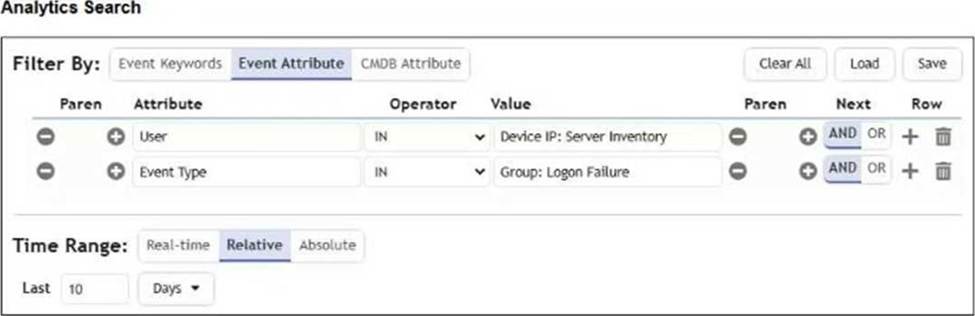
The analyst is troubleshooting the analytics query shown in the exhibit.
Why is this search not producing any results?
A. The Time Range is set incorrectly.
B. The inner and outer nested query attribute types do not match.
C. You cannot reference User and Event Type attributes in the same search.
D. The Boolean operator is wrong between the attributes.
Explanation:
The search fails because nested analytics queries require the outer query attribute type to match the inner query display-column data type. The FortiSIEM Study Guide explicitly explains this rule in the Nested Query section: “Another important aspect to understand is that the data value types must match.” It further explains that each inner query display column has a data value type, such as IP, string, or integer, and the outer query attribute must match that type. The FortiSIEM 7.4 User Guide states the same operational requirement: for a nested query to work correctly, “the data type of the filter attribute in the outer query must match up with the data type of one certain display column in the inner query.” Therefore, if the inner query returns a string attribute but the outer query compares it against an IP-type attribute, FortiSIEM cannot produce a valid match. The issue is not the time range, not the use of User and Event Type together, and not the Boolean operator. It is an attribute type mismatch between the query and subquery.
Question#4
Refer to the exhibit.
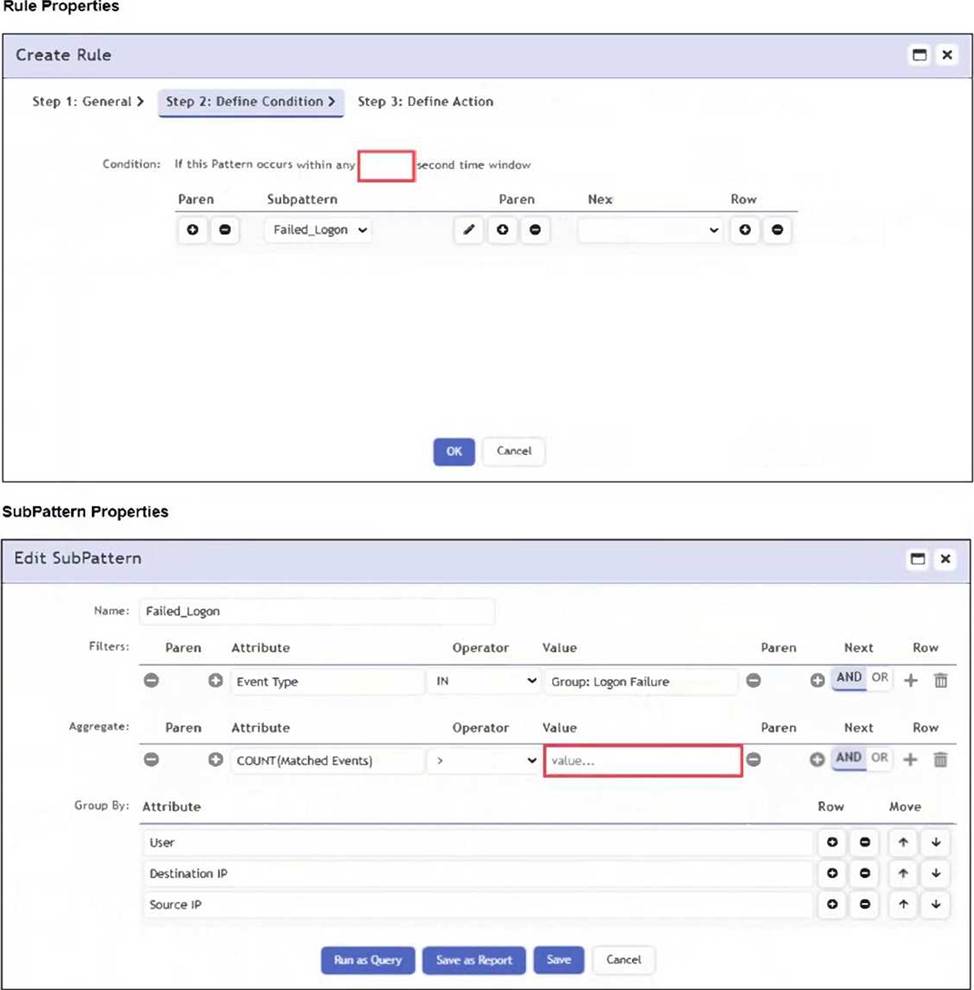
An analyst wants the rule shown in the exhibit to trigger when three failed login attempts occur within three minutes.
What should the values be for the condition time window and aggregate count?
A. Time window 180 seconds, aggregate count 3
B. Time window 180 seconds, aggregate count 2
C. Time window 90 seconds, aggregate count 3
D. Time window 90 seconds, aggregate count 2
Explanation:
To detect three failed login attempts within three minutes, you must set the aggregate count to 3 in the subpattern and the time window to 180 seconds in the rule condition. This ensures the rule triggers only if three or more failed logins occur in that timeframe.
The correct answer is A because three minutes equals 180 seconds, and the aggregate threshold must be set to three matching events. The FortiSIEM Study Guide explains that rule conditions specify event attributes and thresholds that trigger the rule and create an incident. It further states that the time window defines the period within which the subpattern must match for the rule condition to be satisfied. The Study Guide’s single-subpattern rule example shows the same principle: the condition has a configured time window, and the Aggregate section uses a function such as COUNT(Matched Events) to require a minimum number of matching events. In this question, the analyst wants the rule to trigger when three failed login attempts happen within three minutes.
Therefore, the rule condition time window must be 180 seconds, and the aggregate count must be 3. A 90-second window would detect only events inside one and a half minutes, not the required three minutes. An aggregate count of 2 would trigger too early because the requirement is three failed attempts.
Question#5
Refer to the exhibit.
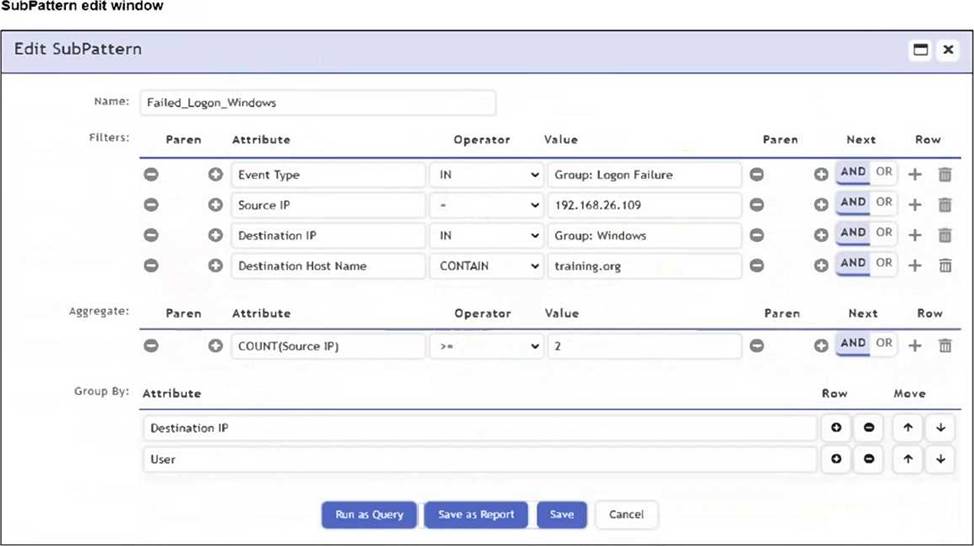
An analyst is troubleshooting the rule shown in the exhibit. It is not generating any incidents, but the filter parameters are generating events on the Analytics tab.
What is wrong with the rule conditions?
A. The Event Type refers to a CMDB lookup and should be an Event lookup.
B. The Destination Host Name value is not fully qualified.
C. The Group By attributes restricts which events are counted.
D. The Aggregate attribute is too restrictive.
Explanation:
The correct answer is C because the rule’s Group By attributes determine how events are grouped before the aggregate condition is evaluated. The Study Guide explains that rule conditions are built from subpatterns consisting of event attribute filters and aggregation functions. It also explains that a subpattern combines filters, aggregate, and group by fields to form the rule logic. In this case, the filters may return matching events in Analytics, but the rule still may not trigger because the aggregate condition is calculated separately for each unique Group By combination. The exhibit groups by Destination IP and User while applying COUNT(Source IP) >= 2. This means FortiSIEM does not count all matching events together. Instead, it counts only events that share the same Destination IP and User combination. If no single grouped combination reaches the aggregate threshold, no incident is created. The issue is not the event lookup, not the Destination Host Name format, and not necessarily the aggregate expression itself. The grouping logic is what restricts the counted event set.
Disclaimer
This page is for educational and exam preparation reference only. It is not affiliated with Fortinet, NSE 6, or the official exam provider. Candidates should refer to official documentation and training for authoritative information.


