NSE7_FSN_AR-7.6 Exam Guide
This NSE7_FSN_AR-7.6 exam focuses on practical knowledge and exam application scenarios related to the subject area. It evaluates your ability to understand core concepts, apply best practices, and make informed decisions in realistic situations rather than relying solely on memorization.
This page provides a structured exam guide, including exam focus areas, skills measured, preparation recommendations, and practice questions with explanations to support effective learning.
Exam Overview
The NSE7_FSN_AR-7.6 exam typically emphasizes how concepts are used in professional environments, testing both theoretical understanding and practical problem-solving skills.
Skills Measured
- Understanding of core concepts and terminology
- Ability to apply knowledge to practical scenarios
- Analysis and evaluation of solution options
- Identification of best practices and common use cases
Preparation Tips
Successful candidates combine conceptual understanding with hands-on practice. Reviewing measured skills and working through scenario-based questions is strongly recommended.
Practice Questions for NSE7_FSN_AR-7.6 Exam
The following practice questions are designed to reinforce key NSE7_FSN_AR-7.6 exam concepts and reflect common scenario-based decision points tested in the certification.
Question#1
During the last network migration, the IT department discovered that all-zero phase selectors in phase 2 IPsec configurations impacted network operations.
What are two valid recommendations to prevent potential invalid paths during future migrations? (Choose two.)
A. Configure routing protocols to specify allowed subnets over the tunnel.
B. Configure an IPsec aggregate to create redundancy between each firewall peer.
C. Configure an IP address on the IPsec interface of each firewall to establish unique peer connections and avoid impacting network operations.
D. Configure the VPN with the exact network segments that will be encrypted in the phase 2 selectors.
Explanation:
The Enterprise Firewall 7.6 Administrator Study Guide specifically warns that all-zero phase 2 selectors can introduce invalid paths during migrations, particularly when many routes are advertised across VPN tunnels or overlapping networks exist. One recommended mitigation is to use dynamic routing protocols to explicitly control which subnets are permitted and advertised through the tunnel, making A correct.
Fortinet also recommends defining the required encryption domains precisely in the phase 2 selectors. Specifying the exact network segments ensures that only designated traffic is eligible for the IPsec tunnel, making D correct. An IPsec aggregate provides redundancy but does not solve inappropriate route or encryption-domain selection. Assigning IP addresses to tunnel interfaces can support routing designs, but it is not the documented mitigation for invalid paths caused by overly broad all-zero selectors.
Question#2
Exhibit.
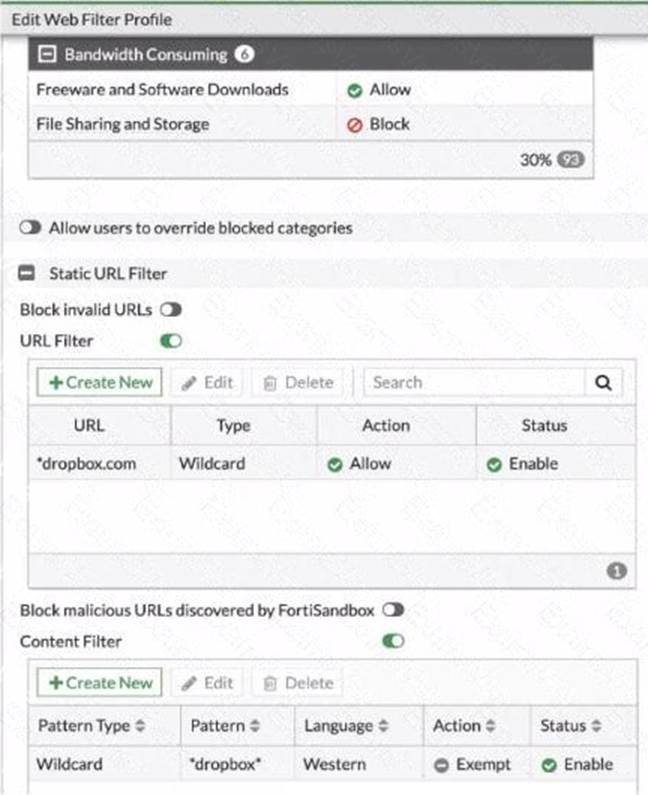
Refer to the exhibit, which shows a partial web fillet profile configuration.
Which action does FortiGate lake if a user attempts to access www. dropbox. com, which is categorized as File Sharing and Storage?
A. FortiGate allows the connection, based on the URL Filter configuration.
B. FortiGate blocks the connection as an invalid UR
C. FortiGate exempts the connection, based on the Web Content Filter configuration.
D. FortiGate blocks the connection, based on the FortiGuard category based filter configuration.
Explanation:
https://community.fortinet.com/t5/FortiGate/Technical-Tip-FortiGate-Static-URL-filter-actions-explained/ta-p /206632
Question#3
Refer to the exhibit, which shows a partial output of a real-time LDAP debug.
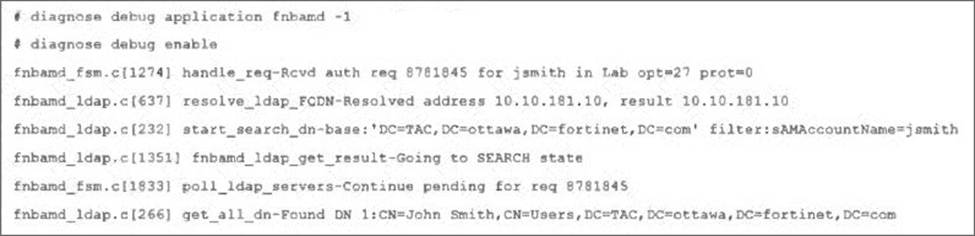
What two conclusions can you draw from the output? (Choose two.)
A. The user was found in the LDAP tree, whose root is TA
B. ottawa.fortinet.com.
C. FortiOS performs a bind to the LDAP server using the user ' s credentials.
D. FortiOS collects the user group information.
E. FortiOS is performing the second step (Search Request) in the LDAP authentication process.
Explanation:
The exhibit includes these key debug lines:
start_search_dn-base: ' DC=TAC, DC=ottawa, DC=fortinet, DC=com ' filter: sAMAccountName=jsmith get_all_dn-Found DN 1: CN=John Smith, CN=Users, DC=TAC, DC=ottawa, DC=fortinet, DC=com
The study guide explains that in regular bind, LDAP authentication has four steps, and that during step 2, FortiGate searches the LDAP tree to find the user’s DN:
“During the second step, FortiGate does a search query in the LDAP database to find the user’s location―in other words, the user’s DN. If the user is found, the server replies with the user’s DN.”
It also states for the real-time debug of step 2:
“An fnbamd_ldap_build_dn_search_req-base message indicates that FortiGate is performing step two: searching for the user in the LDAP tree. This message includes the base branch (distinguished name setting) and the name of the attribute used to locate the user... If the LDAP server finds the user, the output shows the user’s full DN.”
That directly proves:
D is correct because the debug is showing step 2: Search Request
A is correct because the base DN and found DN are under DC=TAC, DC=ottawa, DC=fortinet, DC=com, which corresponds to the LDAP domain/tree root TAC.ottawa.fortinet.com
Why the other options are wrong:
B is wrong because binding with the user’s credentials is step 3, not the step shown here. The study guide says: “Step 3 C Bind user credentials” and shows that this happens later with fnbamd_ldap_build_userbind_req /__ldap_build_bind_req-Binding to ' CN=John Smith... '
C is wrong because collecting user group information is step 4, not the step shown in the exhibit. The study guide says: “The last step is to get the user group information” and shows step 4 with Attr query /memberOf search
Question#4
Refer to the exhibit, which shows the output of get router info ospf neighbor.
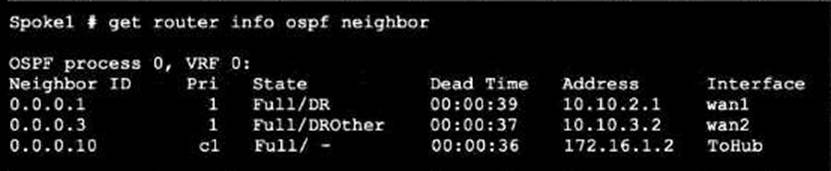
What can you conclude from the command output?
A. The network type connecting the local Fortigate and OSPF neighbor 0.0.0.10 is point-to-point.
B. All neighbors are in area 0.0.0.0.
C. The local FortiGate is the BD
D. The local FortiGate is not a DROther.
Question#5
Refer to the exhibit, which shows one way communication of the downstream FortiGate with the upstream FortiGate within a Security Fabric.
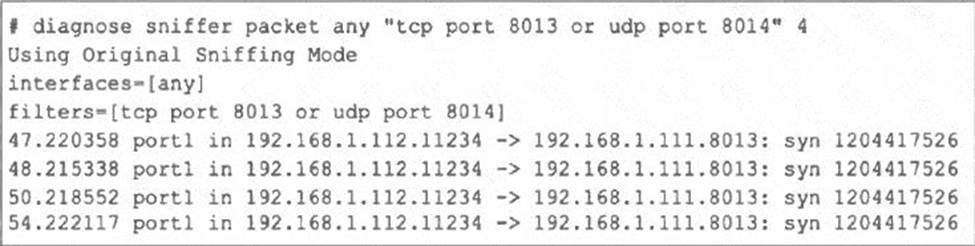
What three actions must you take to ensure successful communication? (Choose three.)
A. You must authorize the downstream FortiGate on the root FortiGate.
B. FortiGate must not be in NAT mode.
C. Ensure TCP port 8013 is not blocked along the way.
D. You must enable Security Fabric/Fortitelemetry on the receiving interface of the upstream FortiGate.
E. Ensure the port for Neighbor Discovery has been changed.
Disclaimer
This page is for educational and exam preparation reference only. It is not affiliated with Fortinet, NSE 7 in Secure Networking, or the official exam provider. Candidates should refer to official documentation and training for authoritative information.


