NSEI_OTS_AR-7.6 Exam Guide
This NSEI_OTS_AR-7.6 exam focuses on practical knowledge and exam application scenarios related to the subject area. It evaluates your ability to understand core concepts, apply best practices, and make informed decisions in realistic situations rather than relying solely on memorization.
This page provides a structured exam guide, including exam focus areas, skills measured, preparation recommendations, and practice questions with explanations to support effective learning.
Exam Overview
The NSEI_OTS_AR-7.6 exam typically emphasizes how concepts are used in professional environments, testing both theoretical understanding and practical problem-solving skills.
Skills Measured
- Understanding of core concepts and terminology
- Ability to apply knowledge to practical scenarios
- Analysis and evaluation of solution options
- Identification of best practices and common use cases
Preparation Tips
Successful candidates combine conceptual understanding with hands-on practice. Reviewing measured skills and working through scenario-based questions is strongly recommended.
Practice Questions for NSEI_OTS_AR-7.6 Exam
The following practice questions are designed to reinforce key NSEI_OTS_AR-7.6 exam concepts and reflect common scenario-based decision points tested in the certification.
Question#1
For the installation of your first FortiGate device, you want to minimize the impact in your OT network. Therefore, you deploy it initially as an offline IDS.
Which two statements about this deployment are correct? (Choose two answers)
A. The FortiGate device acts as a network sensor.
B. The cybersecurity visibility increases with the security profiles.
C. Attacks, including zero-day attacks, are blocked.
D. OT traffic flows through the FortiGate device.
Explanation:
Deploying a FortiGate in offline IDS (also known as one-arm sniffer mode) is a common strategy in OT environments for several reasons found in the study guide:
Question#2
You want to improve access control for your large OT network using passive authentication.
What must you configure on FortiGate? (Choose one answer)
A. Fortinet Single-Sign On (FSSO)
B. Local users
C. Two-factor authentication
D. A FortiAuthenticator device as a remote server
Explanation:
The correct answer is A. Fortinet Single-Sign On (FSSO). The study guide states under Active and Passive Authentication that for passive authentication, “User does not receive a login prompt from FortiGate”, “Credentials are determined automatically”, and specifically “FSSO, RSSO, and NTLM can be used.” It then explains that passive authentication occurs with the single sign-on method and explicitly identifies Fortinet SSO (FSSO) as one of those methods. The guide also says: “For passive authentication, you can implement FSSO. FSSO allows users who have already authenticated on the network through another system to be transparently identified. After initial login to any system on the network, users can access allowed resources without being prompted for credentials.” That is exactly what the question asks for: improving access control in a large OT network using passive authentication.
The other options do not match passive authentication. Local users are part of local authentication, two-factor authentication adds an extra security factor but still uses active authentication, and FortiAuthenticator as a remote server supports centralized authentication for mid-to-large networks, but by itself it is not the specific passive-authentication method being asked here. The study guide is explicit that the FortiGate configuration for passive authentication is FSSO.
Question#3
Refer to the exhibits.
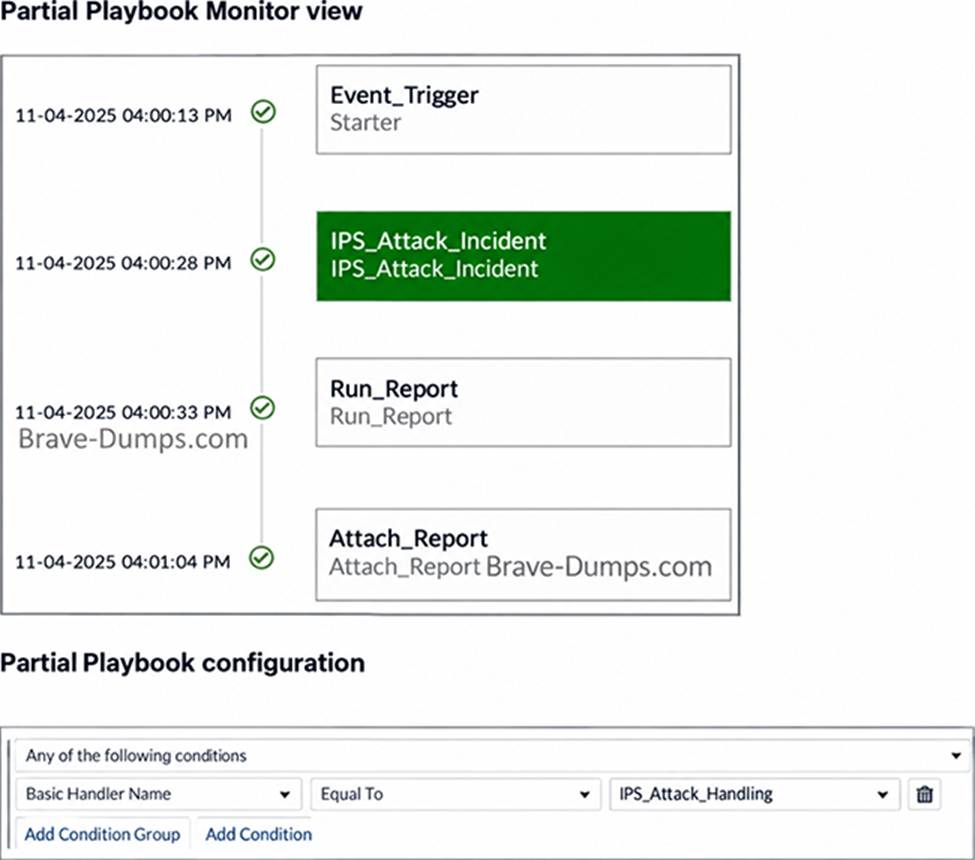
A partial view of the Playbook Monitor page and the corresponding playbook configuration are shown.
Based on the monitor page and the configuration of the playbook, what has triggered the Run_Report task? (Choose one answer)
A. An IPS_Attack_Handling event
B. An IPS incident creation
C. An Event_Trigger log
D. An IPS_Attack_Incident log
Explanation:
Based on the provided exhibits from the FortiAnalyzer playbook engine: Therefore, the Run_Report task was triggered (as part of the playbook) by an IPS_Attack_Handling event.
Question#5
Refer to the exhibit.
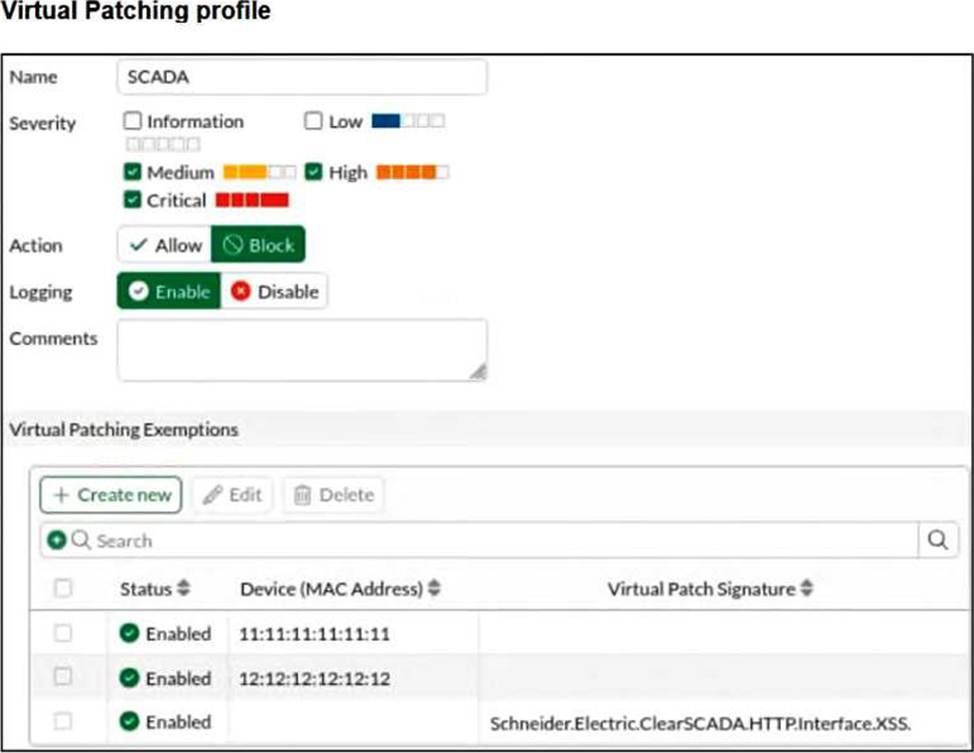
A Virtual Patching profile is shown. You have recently updated your SCADA system and would like to apply the SCADA virtual patching profile.
Which two statements about this profile are correct? (Choose two answers)
A. Only the vulnerability Schneider.Electric.ClearSCAD
B. HTT
C. Interface.XSS is still present.
D. Low severity signatures are not blocked for the device with the MAC address 12:12:12:12:12.
E. This profile blocks critical severity signatures for all the devices.
F. The device with the MAC address 11:11:11:11:11 is considered to have no vulnerabilities.
Explanation:
The correct answers are B and D.
Option B is correct because the profile has Medium, High, and Critical selected, while Low severity is not selected. That means low-severity virtual patching signatures are not enforced by this profile. So for the device with MAC address 12:12:12:12:12, low-severity signatures are not blocked. The study guide explains virtual patching as device-specific protection where “FortiGate caches the signatures and mitigation rules that apply to each device” and applies them when the related traffic matches the firewall policy.
Option D is correct because the Virtual Patching Exemptions table shows a row with the MAC address 11:11:11:11:11 and no specific signature listed. The study guide states that in the Virtual Patching profile you can “Exempt a specific device with the MAC address or a specific signature.” A MAC-only exemption means that specific device is excluded from virtual patching enforcement, so in practical terms it is treated as having no applicable vulnerabilities in this profile.
Option C is incorrect because the profile does not block critical signatures for all devices. The exemptions list proves that at least one device can be excluded by MAC address, and a specific signature can also be exempted. Therefore, enforcement is not universal across all devices.
Option A is incorrect because the entry Schneider.Electric.ClearSCADA.HTTP.Interface.XSS appears as a specific signature exemption, not as the only remaining vulnerability. The profile display is showing exemptions, not a statement that only one vulnerability is still present.
Disclaimer
This page is for educational and exam preparation reference only. It is not affiliated with Fortinet, NSE Industry, or the official exam provider. Candidates should refer to official documentation and training for authoritative information.


