Observability Self Hosted Fundamentals Exam Guide
This Observability Self Hosted Fundamentals exam focuses on practical knowledge and exam application scenarios related to the subject area. It evaluates your ability to understand core concepts, apply best practices, and make informed decisions in realistic situations rather than relying solely on memorization.
This page provides a structured exam guide, including exam focus areas, skills measured, preparation recommendations, and practice questions with explanations to support effective learning.
Exam Overview
The Observability Self Hosted Fundamentals exam typically emphasizes how concepts are used in professional environments, testing both theoretical understanding and practical problem-solving skills.
Skills Measured
- Understanding of core concepts and terminology
- Ability to apply knowledge to practical scenarios
- Analysis and evaluation of solution options
- Identification of best practices and common use cases
Preparation Tips
Successful candidates combine conceptual understanding with hands-on practice. Reviewing measured skills and working through scenario-based questions is strongly recommended.
Practice Questions for Observability Self Hosted Fundamentals Exam
The following practice questions are designed to reinforce key Observability Self Hosted Fundamentals exam concepts and reflect common scenario-based decision points tested in the certification.
Question#1
Multiple users have access to SolarWinds Hybrid Cloud Observability (HCO) reports. All users are permitted to view and run existing reports, however restrictions for a smaller group of users are needed for editing and creating reports.
How should these restrictions be accomplished?
A. remove manage reports button for any user without edit permissions
B. remove reports view from menu bar for any user without edit permissions
C. set alert limitation category to default for select users with edit permissions
D. set allow alert management rights to yes for select users with edit permissions
Explanation:
The ability to create or modify reports is a high-level administrative function in the SolarWinds Platform, distinct from the ability to simply view them. According to the SolarWinds Platform User Account Management guide, this is controlled by the Report Management right.
To restrict a specific group of users from creating or editing reports while still allowing them to view existing ones, the administrator must remove the "Manage Reports" permission from their user accounts. When this right is set to "No," the "Manage Reports" button is hidden from the "All Reports" view for that user. They can still click on and run any report they have access to, but they will lack the interface options to enter the "Report Builder," change schedules, or delete entries. This provides a secure way to delegate report consumption to the wider team while centralizing report creation within a smaller group of "power users" or administrators. Option D is incorrect as it refers to Alerts, which is a separate permission set entirely.
Question#2
Which two of the following use cases are utilized for account limitations? (Choose two.)
A. access to monitored data by departments
B. access to monitored data by device types
C. access to features by departments
D. polling of devices by location
Explanation:
Account Limitations are security filters applied at the user or group level to control data visibility
within the Web Console. According to the SolarWinds Platform User Account Management guide, these limitations do not affect how data is collected (polling), but rather who can see the resulting data.
The two primary use cases are:
Access by Department (A): Organizations often use custom properties (like "Department") to tag nodes. By applying an account limitation, you can ensure that the "Finance" team only sees servers tagged for their department, while the "IT" team sees the entire infrastructure.
Access by Device Type (B): Limitations can be set based on vendor, machine type, or other attributes. For instance, a Network Operations Center (NOC) team might be limited to seeing only "Cisco" or "Juniper" devices to keep their dashboard focused purely on networking gear.
Option C is incorrect because "access to features" (like the ability to manage alerts or reports) is handled via Account Permissions, not limitations. Option D is incorrect because "polling of devices" is a backend function of the Polling Engines, which is managed via the "Manage Nodes" section rather than user-facing account limitations.
Question#3
Which statement defines the meaning of acknowledging an alert?
A. The issue that triggered the alert has been resolved.
B. The issue that triggered the alert is being worked on.
C. The issue that triggered the alert is being worked on and will be escalated.
D. The issue that triggered the alert is being worked on and will not be escalated.
Explanation:
In the SolarWinds alerting workflow, "Acknowledgment" is a critical state change that coordinates the human response to an incident. According to the SolarWinds Platform Alerting Guide, acknowledging an alert communicates to the rest of the team that a specific technician has taken ownership of the issue.
The formal definition of acknowledgment is that the issue is being worked on and the alert will not be escalated. This is the most important functional result of the action: it halts the automated escalation chain. If an alert was configured to email a manager after 30 minutes of inactivity, acknowledging the alert at the 15-minute mark cancels that pending manager email. It signals to the system―and other operators―that active troubleshooting is underway and further automated "noise" is unnecessary.
It is important to note that acknowledgment does not mean the issue is resolved (Option A); the alert remains active in the "All Active Alerts" list (though often filtered into an "Acknowledged" category) until the underlying trigger condition is cleared by the monitoring engine. It is a procedural tool for incident management, ensuring that once a human engages with a problem, the platform's automated notification logic steps aside to let them work without further distraction.
Question#4
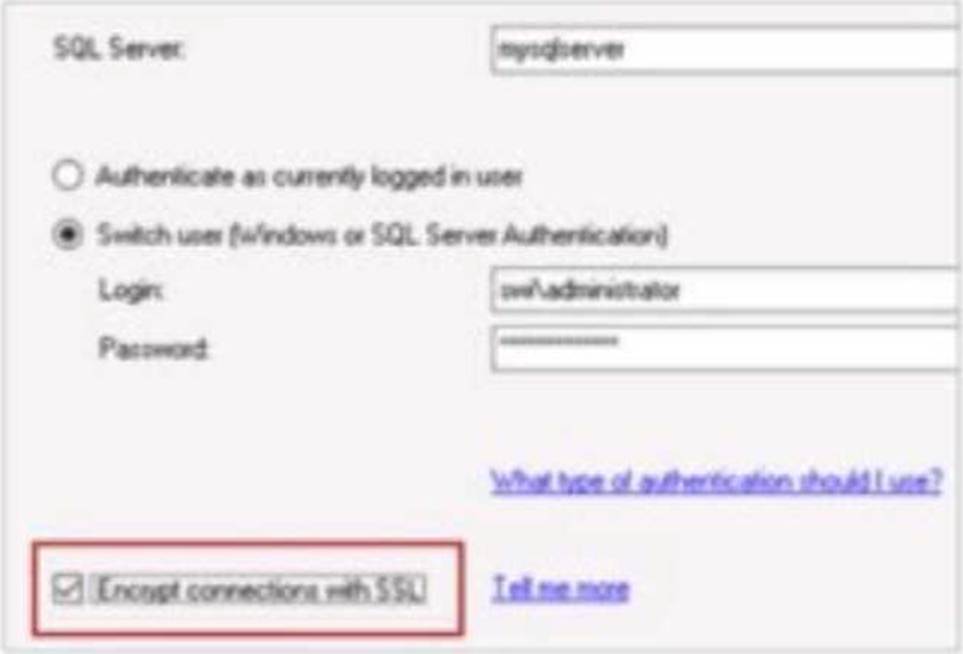
What is the effect of checking the Encrypt connections with SSL box in the configuration wizard?
A. The installed SolarWinds product will use the login account to access the databases on the SQL server.
B. The login account to access the SQL server will be encrypted and stored in SolarWinds' Hybrid Cloud Observability Platform server.
C. The login credentials will be encrypted between SolarWinds' Hybrid Cloud Observability Platform server and the SQL server while in transit.
D. The network data between SolarWinds' Hybrid Cloud Observability Platform server and the SQL server will be encrypted.
Explanation:
According to the SolarWinds Platform configuration documentation, the option to Encrypt connections with SSL during the database configuration wizard specifically dictates the security level of the communication channel between the application server and the database backend. When this box is checked, the platform ensures that the network data between SolarWinds' Hybrid Cloud Observability Platform server and the SQL server will be encrypted. This security measure is critical for protecting the integrity and confidentiality of the performance metrics, configuration data, and credentials as they traverse the internal network between these two primary architectural components.
This encryption utilizes Transport Layer Security (TLS) to wrap the TDS (Tabular Data Stream) protocol used by Microsoft SQL Server. By enabling this feature, the platform prevents potential "man-in-the-middle" attacks where an adversary could sniff network traffic to intercept sensitive monitoring data or administrative information stored within the SQL database. It is important to note that for this setting to function correctly, the SQL Server must be configured with a valid SSL/TLS certificate that is trusted by the SolarWinds application server.
This setting differs from simple credential encryption (Option C) or secure storage (Option B) because it applies to all data transmitted during the session, not just the initial login exchange. Furthermore, while the configuration wizard does require a login account (Option A), that account's specific permissions are a separate functional requirement from the underlying encryption of the transport layer. Enabling SSL encryption is a standard best practice for organizations following strict compliance frameworks like HIPAA, PCI-DSS, or SOC2, where protecting data-in-transit is a mandatory requirement even on internal, "trusted" network segments. This centralized encryption toggle simplifies the deployment of high-security observability environments by orchestrating the secure connection parameters through the standard SolarWinds Configuration Wizard interface.
Disclaimer
This page is for educational and exam preparation reference only. It is not affiliated with SolarWinds, SolarWinds Certified Professional, or the official exam provider. Candidates should refer to official documentation and training for authoritative information.


