Terraform Associate 004 Exam Guide
This Terraform Associate 004 exam focuses on practical knowledge and exam application scenarios related to the subject area. It evaluates your ability to understand core concepts, apply best practices, and make informed decisions in realistic situations rather than relying solely on memorization.
This page provides a structured exam guide, including exam focus areas, skills measured, preparation recommendations, and practice questions with explanations to support effective learning.
Exam Overview
The Terraform Associate 004 exam typically emphasizes how concepts are used in professional environments, testing both theoretical understanding and practical problem-solving skills.
Skills Measured
- Understanding of core concepts and terminology
- Ability to apply knowledge to practical scenarios
- Analysis and evaluation of solution options
- Identification of best practices and common use cases
Preparation Tips
Successful candidates combine conceptual understanding with hands-on practice. Reviewing measured skills and working through scenario-based questions is strongly recommended.
Practice Questions for Terraform Associate 004 Exam
The following practice questions are designed to reinforce key Terraform Associate 004 exam concepts and reflect common scenario-based decision points tested in the certification.
Question#2
Why would you use the -replace flag for terraform apply?
A. You want to force Terraform to destroy a resource on the next apply.
B. You want Terraform to ignore a resource on the next apply.
C. You want to force Terraform to destroy and recreate a resource on the next apply.
D. You want Terraform to destroy all the infrastructure in your workspace.
Explanation:
Rationale for Correct Answer
terraform apply -replace=ADDRESS forces Terraform to replace the specified resource during the next apply, meaning it will plan to destroy and then recreate it (or create-before-destroy if the resource supports it and the graph/lifecycle allows). This is used when a resource is unhealthy, drifted in a way that’s hard to correct, or you want a fresh instance without changing configuration.
Analysis of Incorrect Options (Distractors):
A: Incorrect―-replace is not “destroy only”; it’s destroy + recreate.
B: Incorrect―ignoring changes is done with lifecycle ignore_changes, not -replace.
D: Incorrect―destroying everything is terraform destroy (or apply with all resources removed), not - replace.
Key Concept: Forcing resource replacement using -replace in the apply workflow.
Reference: Terraform Objectives ― Manage Terraform Resources and Providers (resource lifecycle and change actions), Understand Terraform Basics and CLI (apply flags).
Question#3
Why does this backend configuration not follow best practices?
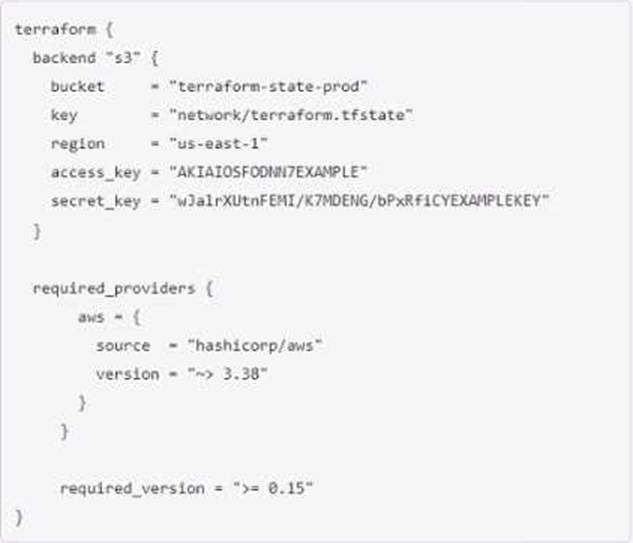
A. An alias meta-argument should be included in backend blocks whenever possible
B. You should use the local enhanced storage backend whenever possible
C. You should not store credentials in Terraform configuration
D. The backend configuration should contain multiple credentials so that more than one user can execute terraform plan and terraform apply
Explanation:
This is a bad practice, as it exposes your credentials to anyone who can access your configuration files or state files. You should use environment variables, credential files, or other mechanisms to provide credentials to Terraform.
Disclaimer
This page is for educational and exam preparation reference only. It is not affiliated with HashiCorp, Terraform Associate, or the official exam provider. Candidates should refer to official documentation and training for authoritative information.


